WhatsApp is working on a new feature that could make remembering friends' and family's birthdays much easier by introducing a dedicated birthday section and in-app reminders, according to the latest report from WABetaInfo.
The upcoming feature, currently under development for Android, is designed to notify users when one of their contacts has a birthday.
Similar to birthday reminders available on Facebook, the feature will allow users to view upcoming birthdays in a dedicated section within WhatsApp and receive alerts when it's time to send their wishes.
The feature has not yet been released to beta testers, and WhatsApp has not announced when it will become available to the public.
A dedicated hub
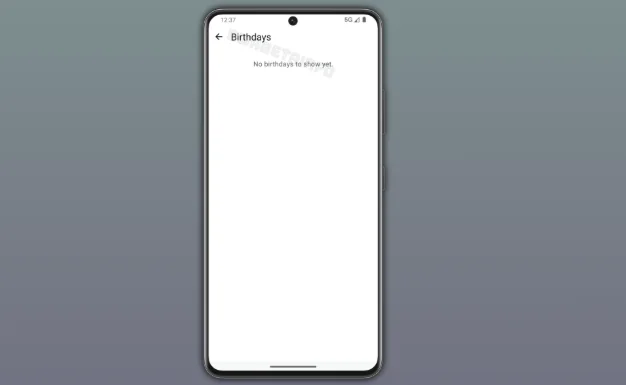
According to WABetaInfo, WhatsApp is creating a new section where users can see upcoming birthdays from their contacts at a glance.
Instead of relying on calendar apps or manually saving important dates, users will be able to check birthdays directly within the messaging platform.
When a contact's birthday arrives, WhatsApp will display an in-app notification, making it easier to remember to send a birthday message without leaving the application.
The move could make WhatsApp a more central part of users' daily lives, particularly since birthday greetings are already among the most common messages exchanged on the platform.
The feature closely resembles Facebook's long-standing birthday reminder system, which has for years alerted users when friends are celebrating birthdays.
Unlike Facebook, however, WhatsApp's reminders are expected to be integrated directly into users' chat experience, making it possible to receive a reminder and immediately send a message, photo, sticker or voice note without switching between apps.
Built on existing birthday information
The new functionality builds on an earlier feature that asked some users to provide their birth year for regulatory and age-verification purposes.
Initially, WhatsApp collected this information solely to comply with legal requirements in certain regions, particularly where online services must verify users' ages. Now, the company appears to be repurposing that information to provide a practical feature for users.
However, birthday reminders will only work if a contact has shared their birthday information with WhatsApp. If a user has never provided their birth date, no reminder will appear for that contact.
Although the feature promises greater convenience, it also raises questions about privacy.
At its current stage of development, WhatsApp has not introduced settings that would allow users to choose whether their birthday is visible to contacts or used only for regulatory purposes.
Privacy controls could still be added before the feature is officially released, giving users greater control over who can view or receive notifications about their birthday.
Making WhatsApp more personal
Birthday reminders are the latest in a series of features aimed at making WhatsApp more than just a messaging app.
Over the past year, Meta has introduced or tested several additions, including usernames, enhanced Wear OS support, AI-powered features, and improvements to group chats.
The birthday section continues that trend by encouraging more personal interactions and making it easier for users to stay connected with family and friends.
Industry observers say the feature could prove particularly useful for users who rely on WhatsApp as their primary communication platform.
Rather than checking separate calendars or social media apps, they would receive timely reminders exactly where they're most likely to send birthday wishes.
As with many features first uncovered by WABetaInfo, there is no guarantee that the birthday reminder system will be released in its current form.
Features discovered in beta development often change launch, while others never reach the public version of the app.
For now, the birthday notification feature remains under active development, with WhatsApp expected to refine the experience before making it available to beta testers and, eventually, users worldwide.
















































Comments
Sign in with Google to comment, reply, and like comments.
Continue with Google